Back to Products

AI Search

Intelligent Video Search System

An intelligent search system that analyzes recorded video stored in NVR using AI to automatically detect specific objects. You can utilize intelligent search capabilities in your existing NVR environment without the need for AI cameras or AI servers.
AI Search

Product Overview

AI-Based Intelligent Search System for NVR Recorded Video

AI Automatic Object Detection

Analyzes recorded video stored in NVR using AI to automatically detect people, vehicles, bicycles, motorcycles, buses, trucks, and more.

Automatic Detection History Management

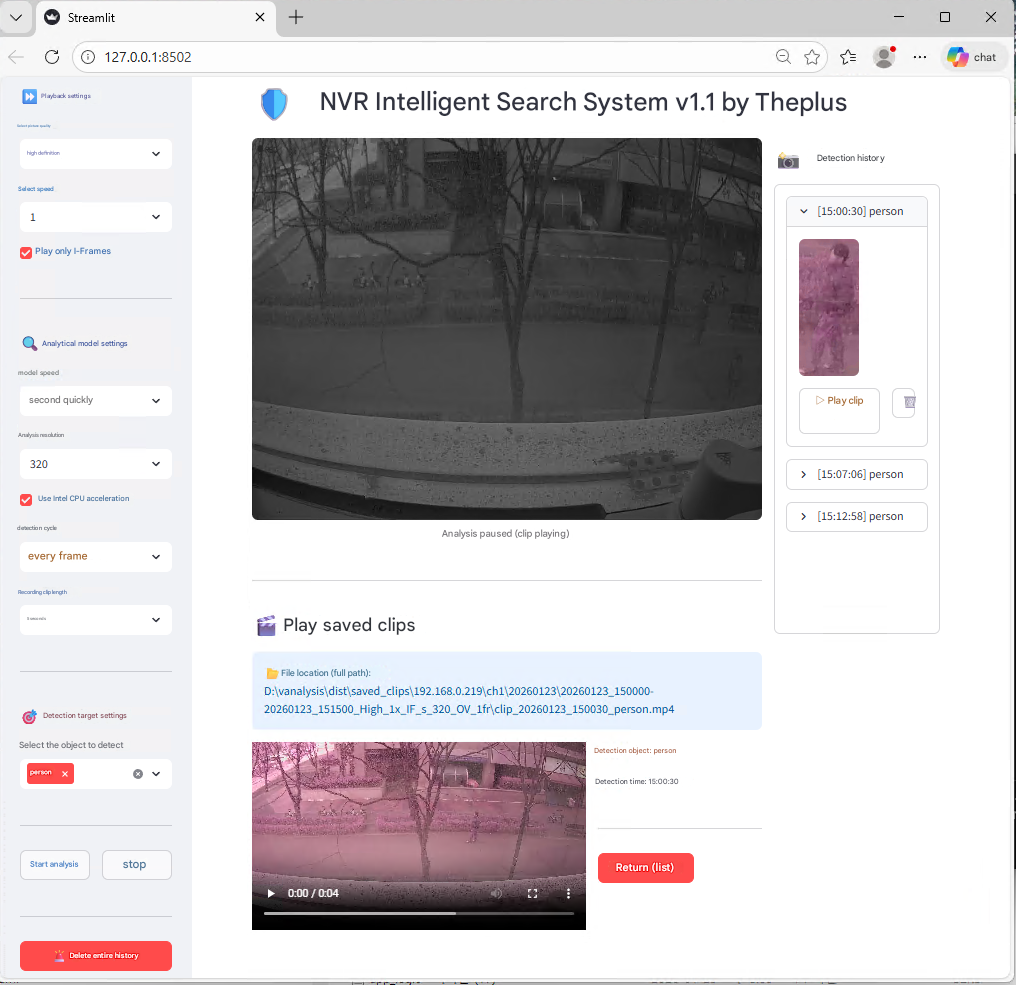
Automatically provides detected object history in list and still-cut format, with support for video preview of the corresponding segment when selected.

Reduced Video Review Time

Quickly and efficiently search for specific objects in large volumes of recorded video, significantly reducing incident verification time.

Utilize Existing NVR Environment

You can utilize intelligent search capabilities immediately in your existing NVR environment without AI cameras or AI servers.

Core Features

Powerful Capabilities of AI Search

Multiple Object Detection

You can select and analyze various objects including people, bicycles, vehicles, motorcycles, buses, and trucks.

Quality Selection Analysis

Choose between high quality (higher accuracy) and low quality (faster speed), with saved video quality determined by the setting.

Variable Speed Analysis

You can select playback speed during video analysis to adjust analysis speed according to PC performance.

Intel CPU Acceleration

Enable Intel CPU acceleration according to PC hardware performance to significantly enhance analysis performance.

Detection Interval Configuration

Configurable frame interval for object detection. Recommended: less than 20 frames for person detection, less than 5 frames for vehicle detection.

Detection History List

Once analysis starts, detected history is sequentially displayed in the right-side list with pause/resume capability.

Clip Playback and Download

When selecting detection history, you can view still-cuts and play clips, and download saved clip files to your PC.

Analysis Resolution Selection

You can select analysis resolution according to the Substream resolution of cameras stored in NVR. Recommended resolution: 640

I-Frame Playback Mode

When saving analyzed video, only I-Frames are saved for fast playback. Supports efficient storage space management.

Web Browser-Based UI

Provides an intuitive interface accessible via web browser without separate installation.

Analysis Configuration Options

AI Search Main Configuration Options

OptionDescriptionRecommended Value
Quality SelectionHigh Quality (accuracy priority) / Low Quality (speed priority)Choose based on environment
Speed SelectionPlayback speed setting to apply during video analysisChoose based on PC performance
Model SpeedAnalysis speed setting (slower improves accuracy)Second fastest
Analysis ResolutionChoose based on Substream resolution640
Intel CPU AccelerationWhether to enable CPU accelerationRecommended
Detection Interval (Person)Frame interval for person object detectionLess than 20 frames
Detection Interval (Vehicle)Frame interval for vehicle object detectionLess than 5 frames
Recording Clip LengthAnalysis result saved clip video lengthConfigure based on environment
Supported VersionVMSPRO minimum version1.25.04 or higher

Use Cases

Various Applications of AI Search

Rapid Incident Verification

Quickly search for specific individuals or vehicles in large volumes of recorded video, significantly reducing incident verification time.

Vehicle Tracking Analysis

Automatically analyze vehicle entry/exit records for specific time periods using AI for efficient vehicle tracking.

Person Movement Verification

Detect individuals identified during specific time periods to efficiently track their movement paths.

Post-Event Security Analysis

Quickly analyze related video using AI after security incidents to secure evidence materials.

Traffic Analysis

Distinguish various transportation modes including bicycles, motorcycles, buses, and trucks to analyze traffic patterns.

Logistics Center Management

Analyze vehicle and personnel movement within logistics centers using AI to improve operational efficiency.

Demo Video

AI Search Operation Screens and Demo Videos