Video Management System
Powerful PC-based video management software that centrally integrates and manages multiple NVRs. Build a professional monitoring environment with remote monitoring, multi-server management, video analytics search, PIP function, multi-monitor configuration, and more.
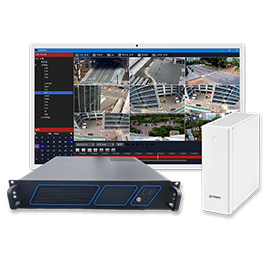
PC-Based Multi-NVR Integrated Video Management Software
Integrate and manage multiple NVRs from a single VMS. Supports manual/automatic server registration and SSL secure connections.
Supports 6 search methods: time search, event search, video analytics search (AI analysis), bookmark search, thumbnail search, and smart search.
Configure favorites according to the number of monitors to simultaneously display different screens on each monitor.
Provides various convenience tools including EXE/AVI converter, snapshot viewer, IPC search, log DB viewer, and privacy masking for footage export.
10+ Representative Features of VMS PRO
Manually register by entering NVR IP, port, and account, or automatically register NVRs through network discovery. Supports SSL secure connections and automatic reconnection.
Register NVRs to favorites and configure screens by selecting only desired cameras. Channel order can be easily changed by dragging.
When zooming to 1-division, display auxiliary cameras simultaneously in PIP (Picture in Picture). Switch between main/sub screens by double-clicking sub screen.
Search events detected through intelligent AI video analytics. Display video analytics data on screen with Text Overlay. Search up to 1,000 results.
Configure favorites according to the number of monitors to display different screens on each monitor. Program can be run individually per monitor.
Select date from calendar and click time on timeline to search footage. Supports playback up to 64x speed and mouse wheel zoom in/out.
Filter and search by event type such as motion and alarm. First event mode eliminates duplicates and displays only core events.
Display footage as images at specified time intervals to quickly identify change points. Also useful for construction site inspections.
Drag a specific area with the mouse to search only motion in that area. Adjust precision with sensitivity settings.
Select desired period and cameras to perform remote backup. Safely backup after capacity check, and EXE/AVI converter also supported.
Access various functions with a single mouse right-click including full screen, snapshot, instant search, IPC audio broadcast, and alarm sound control.
Built-in privacy masking function for footage export. AI privacy masking function available after license registration.
Remotely change NVR settings from VMS and remotely update firmware, enabling management without site visits.
Save and load server list, maps, and VMS settings to files, making system migration and recovery convenient.
| Category | Specifications |
|---|---|
| Server Management | Manual/automatic registration, SSL connection, automatic reconnection, alarm popup |
| Search Functions | Time Search, Event Search, Video Analytics Search (AI Analysis), Bookmark Search, Thumbnail Search, Smart Search (6 types) |
| Playback Speed | Fast forward up to 64x, rewind up to 1x |
| Monitors | Multi-monitor support (individual favorites configuration per monitor) |
| PIP | Picture in Picture function (main/sub screen switching) |
| Backup | Remote footage backup, snapshot save, EXE/AVI converter |
| Additional Tools | Snapshot viewer, IPC search, BNK file play, log DB viewer |
| Footage Export | AI privacy masking footage export (license required) |
| Remote Management | NVR remote configuration, NVR remote update |
| Settings Management | Server list/map/VMS settings save and load |
| Security | Account management, password settings, event server integration |
| Default Account | admin / 1111 |