IP Video Wall
Multi-Display Control System
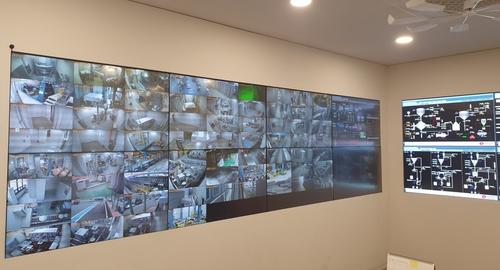
A video wall system that controls multiple monitors as a single integrated display. Integrates with NVR to efficiently arrange and manage large-scale CCTV video.
Multi-Display Control System
A video wall system that controls multiple monitors as a single integrated display. Integrates with NVR to efficiently arrange and manage large-scale CCTV video.
IP-Based Multi-Display Video Display System
Freely arrange and control multiple monitors to build a control center-grade video monitoring environment.
Seamlessly integrates with NVR for convenient server management through manual/automatic registration.
Configure layouts combining camera groups, text, and images, and quickly switch using hotkeys.
Supports event integration that automatically displays corresponding camera video on the video wall when NVR events occur.
Over 10 Major Features of IP Video Wall
Register directly with the Add NVR button, or easily register by automatically searching for NVRs installed on the network with NVR Search.
Automatically search for installed video walls with the Video Wall Search button and easily register by assigning names.
Select desired cameras from the server (NVR) to create groups and manage camera groups to display on the video wall.
Display text strings and images on monitors with freely configurable size/color/position. Supports camera OSD, event text, and border settings.
Enter horizontal number to match actual monitor arrangement and intuitively position monitors by dragging with the mouse.
Create new layouts and freely configure screens sized for monitors by combining camera groups/text/images.
Assign F1~F12, Ctrl+F1~F12, Shift+F1~F12 hotkeys to instantly switch screens to saved layouts.
Press the auto-switch button to enable rotational monitoring with registered layouts automatically switching at set time intervals.
When displaying camera groups on the video wall, specify the number of cameras in horizontal (column) direction numerically for optimal arrangement.
Double-click the camera to zoom to enlarge the screen on that monitor. Double-click again to restore.
Select one or multiple desired cameras from the camera list to directly display on the desired monitor.
Automatically displays corresponding camera video when NVR events occur, providing notifications with event text and blinking borders.
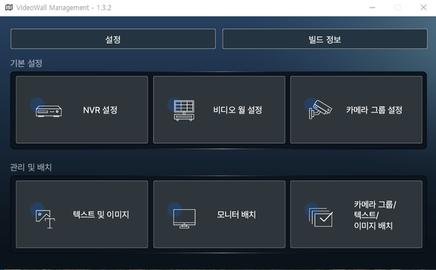
Video Wall Client Configuration Items
| Configuration Item | Description |
|---|---|
| Language Settings | Set client language to Korean |
| Settings Management | Save or load configuration values |
| Server Settings | Server configuration for event integration |
| NVR Settings | Add/modify/delete NVRs to connect to video wall |
| Video Wall Settings | Add/modify/delete video walls to manage |
| Camera Groups | Configure camera groups to display on video wall |
| Text/Images | Add/modify/delete text strings and image files |
| Monitor Arrangement | Adjust connected monitor arrangement (1920x1080 recommended) |
| Video Arrangement | Configure camera groups, text, and images as layouts |
| Camera Names | Use NVR names or specify in client |